

Premium Feature: Semantics Helper
Description:
- theWord Version: 7.7.1.1613 or newer
- Bible View – Semantic Rule Highlights: Bibles with Morphology
- Bible View Options: Use Pre-built rules and add your own.
- Pre-built rules
- Build your own: Verbs, Nouns, using the Simple Builder Or more complex using morph-code directly like *-NSM for Articles and Nouns that match.
- Rules can Hover On as you move the mouse around or be Always On.
- Rules can be tied to the selected verse or the chapter (Example: Verbs throughout).
- .morphx files
- Used for Building custom rules in the Semantics Helper
- Available through Add Titles in the MorphX section required for this feature.
- BSB-MorphX for BSBHebInt, BSBGrkInt, BSBRevInt
- BHS5-ETCBC-MorphX for BHS5/ETCBC
- LXX-PMAC-MorphX for lxx
- RMAC-MorphX for NA28, BYZa, SBLGNT, etc.
- WHMC-MorphX for WHM 4.22
Premium Feature: Inline Bible Search Helper
Description:
- theWord Version: 7.7.1.1612 or newer
- Bible Background Indexer
- Indexes the Bibles to provide much internal data (Original Word, Strong, Lemma, Morphology). This is required for the use of the Inline Helper, Bible Search Helper.
- .morphx files
- Used for Definitions of the Morphology code
- Available through Add Titles in the MorphX section required for full functionality of this feature.
- BSB-MorphX for BSBHebInt, BSBGrkInt, BSBRevInt
- BHS5-ETCBC-MorphX for BHS5/ETCBC
- LXX-PMAC-MorphX for lxx
- RMAC-MorphX for NA28, BYZa, SBLGNT, etc.
- WHMC-MorphX for WHM 4.22
- Bible View – Top translation words: for Bibles with Strong’s #/Lemma
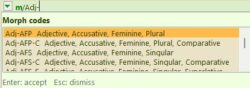
- Bible Search – inline helper (as you type it gives you a list of available terms.)
- Auto complete for Original Words (English, Hebrew, Greek, Main Text of the Bible)
- Auto complete for Strongs (H#, G#)
- Auto complete for Lemma (Hebrew/Greek)
- Auto complete for Morphology with expanded definition:
- BSB-MorphX for BSBHebInt, BSBGrkInt, BSBRevInt
- BHS5-ETCBC-MorphX for BHS5/ETCBC
- LXX-PMAC-MorphX for lxx
- RMAC-MorphX for NA28, BYZa, SBLGNT, etc.
- WHMC-MorphX for WHM 4.22
- Preferences
- Settings for Inline Bible Search Helper

Premium Feature: Full Bible Search Helper
Description:
This is still a work in progress feature and subject to change.
(Note: Premium Features are not needed to use theWord it still maintains existing functionality this just adds special extended features.)
- theWord Version: 7.7.1.1612 or newer
- Bible Background Indexer
- Indexes the Bibles to provide much internal data (Original Word, Strong, Lemma, Morphology). This is required for the use of the Inline Helper, Bible Search Helper.
- .morph files (May be included with their Bibles or this Premium feature (to decide)
- Used for Definitions of the Morphology code and Morphology Builder
- Available through Add Titles in the MorphX section required for full functionality of this feature.
- BSB-MorphX for BSBHebInt, BSBGrkInt, BSBRevInt
- BHS5-ETCBC-MorphX for BHS5/ETCBC
- LXX-PMAC-MorphX for lxx
- RMAC-MorphX for NA28, BYZa, SBLGNT, etc.
- WHMC-MorphX for WHM 4.22
- Bible View – Top translation words: for Bibles with Strong’s #/Lemma
- Bible Search – inline helper (as you type it gives you a list of available terms.)
- Auto complete for Original Words (English, Hebrew, Greek, Main Text of the Bible)
- Auto complete for Strongs (H#, G#)
- Auto complete for Lemma (Hebrew/Greek)
- Auto complete for Morphology with expanded definition:
- BSB-MorphX for BSBHebInt, BSBGrkInt, BSBRevInt
- BHS5-ETCBC-MorphX for BHS5/ETCBC
- LXX-PMAC-MorphX for lxx
- RMAC-MorphX for NA28, BYZa, SBLGNT, etc.
- WHMC-MorphX for WHM 4.22
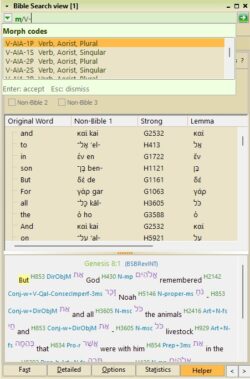
- Bible Search Helper (accessible via Helper tab in Bible Search)
- Tabs: (Dependent on what is supported in a Bible)
- Combined
- Filter for sorting with advanced sorting
- Column Toggles: Original Word, Strong, Lemma, Morphology, Switch Text 1..3, Non-Bible 1..3, Count
- Column Sorting
- Verse Preview
- highlight of hovered word
- Right Click to go to Verse
- Original Word
- Filter for sorting
- Columns: Key, Original Forms (OT, NT), Count
- Column Sorting
- Dictionary shown on Hover if activated.
- Word preview pane
- Double click to send to Bible search
- Strong’s #
- Filter for sorting
- Columns: Key, Top Words, Count
- Column Sorting
- Dictionary shown on Hover if activated.
- Word preview pane
- Double click to send to Bible search
- Morphology
- Filter for sorting
- Columns: Key, Top Words, Count
- Column Sorting
- Dictionary shown on Hover if activated.
- Word preview pane
- Double click to send to Bible search
- Morphology Builder
- Uses the .morph file to help with building morphology
- Part of speech check boxes for easy building of Morphology.
- Matching codes with definitions.
- Lemma
- Filter for sorting
- Columns: Key, Representative Forms, Count
- Column Sorting.
- Send to Lemma Family
- Dictionary shown on Hover if activated.
- Word preview pane
- Double click to send to Bible search
- Lemma Family
- Enter Lemma Root, Include all forms (substring match): Find Family
- Dictionary shown on Hover if activated.
- Double click to send to Bible search
- Syntax Validator
- Used for help you build good Bible Search syntax (may not stay in release)
- Headings
- Filter forsorting
- Columns: Key, Testament, Count
- Double Click to go to first verse occurence
- Right Click to go to a specific verse
- Footnotes
- Filter, Key, Testament, Count
- Double Click to go to first verse occurence
- Right Click to go to a specific verse
- Switch Text 1…3
- Filter for sorting
- Columns: Key, Testament, Count
- Word preview pane
- Non-Bible 1…3
- Filter for sorting
- Columns: Key, Testament, Count
- Word preview pane
- Preferences
- Settings for Bible Search Helper
Custom Pay-it-forward for theWord